 Slatekeeper
Digital film slate · Android phone and tablet
Your phone
is now
a slate.
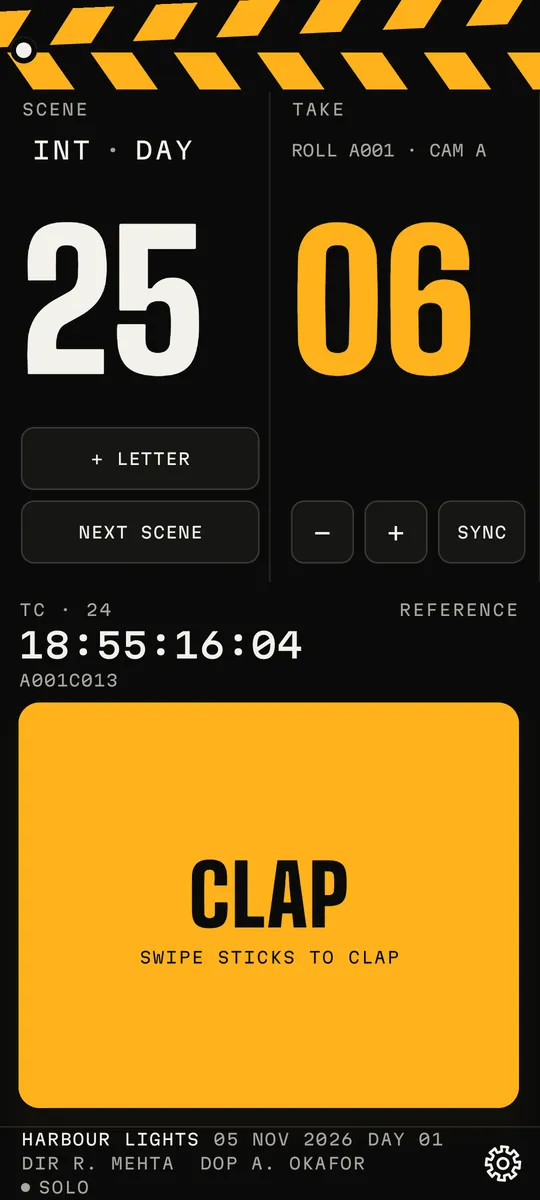
Tap CLAP and the screen flashes while a beep plays at the same instant, so the editor can line picture up with sound. Every take is logged, rated and ready to export. No account, and it works offline. A quick check with Google Play confirms your purchase.
Try it on the right: tap CLAP, drag the sticks down, or press Space. The flash only fills the slate, never the page.
01 / The clap
Flash + beep,
one tap.
The screen flashes a full-white frame and a beep plays at the same instant. The flash is held for three or more frames, and a reduced-flash option is on the first-run page and in Setup. Tap CLAP, or drag the top stick down.
02 / Verdicts and the log
Rate every take.
Send the log.
After a clap, mark it Circle, Good or NG. Swipe up to circle, tap for good, swipe down for NG on the verdict screen. Add tags or a voice note. The demo log below fills as you clap on the slate above.
| Scene | Take | Timecode | Verdict |
|---|
No takes yet. Clap the slate above.
The app exports
03 / Timecode
A clock
you can read.
The big clock shows time of day or a free-running timecode. Pick a rate below. It comes from the phone's own clock, so treat it as a visual reference, not a camera-locked timecode.
Reference only · not camera-locked
04 / Sync
Sync you
can check.
Phones play sound and light at slightly different speeds. In the app, Sync Calibration runs a 10-clap test, and AUTO lines the flash up with the beep. This sketch shows the idea: drag the flash delay until the two marks meet. The numbers here are illustrative, not measurements.
05 / Crew Link
One clap,
every slate.
Put several slates on the same Wi-Fi or a phone hotspot. The host claps and every slate flashes and beeps together, and linked slates follow the host's timecode. No Wi-Fi? Link paired phones over Bluetooth: slower and less steady, so use Wi-Fi when you can. A director remote can fire the host's clap.
Wi-Fi: scan the host's QR to join. Use the set's own Wi-Fi or a hotspot.
Crew Link messages are authenticated but not encrypted, so keep it on a network you trust. Nothing passes through a server of ours.
06 / Screens
Real captures,
phone and tablet.
07 / Everything else
Built for
the set.
Shot list
Planned shots per scene with notes and an optional storyboard frame. Import shots from a text file, a PDF or pasted text, and undo an import. Script notes sit beside it.
Teleprompter
Open the script notes in a scrolling teleprompter with speed, size and mirror controls.
Your slate
Add a production logo that shows on the flash frame, wrap card and PDF. Draw on the slate; the sketch sits on the flash frame beside the QR code. Choose the announcer voice that speaks scene and take, and keep a checklist.
Voice notes
Hold the mic on the verdict screen or in the log, talk, let go to save. On a linked set the host's notes reach every slate, and a slate's note goes to the host to review.
Wrap card
At the end of the day, a shareable card with setups, takes, circled takes, first-to-last times and a clap-by-clap chart. Send the whole log to the editor in one tap.
Timecode input
Reference timecode in 23.976, 24, 25, 29.97 DF, 29.97 and 30, with LTC input and user bits in Setup.
On set
Haptic cues you can turn off, a double-tap on a volume button to clap (off by default), reduced flash, large-text friendly layouts, and phones and tablets in any orientation.
Private by design
Your log stays
on your phone.
- No account and no analytics. Your log, notes, voice notes and location never go to us. The app makes one quick purchase check with Google Play, and works offline.
- The app opts out of Android cloud backup and device transfer, because film material is confidential. A new phone starts empty, so use Export to keep or move a log.
- Crew Link goes directly between your phones. It is authenticated but not encrypted.